The Ollama context window is smaller than most people assume, and when it fills up, Ollama doesn’t tell you. It just quietly forgets the beginning of your conversation and keeps answering like nothing happened.
That’s the part nobody warns you about. Not an error, not a warning in the terminal — just a model that starts responding a little strangely, or a RAG setup that stops referencing half the document you fed it, or a coding agent that forgets an instruction from ten messages back.
Table of Contents
What the Context Window Actually Is
The context window — set by the num_ctx parameter — is the total number of tokens a loaded model can hold in memory at once. System prompt, full conversation history, any document you pasted in, and room left over for the reply itself, all sharing one budget.
Tokens aren’t words. Roughly 1,000 tokens works out to about 750 English words, so a 4,096-token window is somewhere around 3,000 words total — which sounds like a lot until you remember that includes everything: your messages, its replies, and any system prompt, all added together.
If you haven’t settled on a model yet, our guide to the best AI models to run locally is a reasonable place to start before worrying about context tuning.
The Silent Truncation Problem
Here’s the part that actually causes the confusing bug reports. When the running total exceeds num_ctx, Ollama doesn’t throw an error or refuse the request. It drops the oldest messages to make room and answers with whatever’s left.
Nothing announces this happened. No warning in the logs, no error in the response. From your side, the model just starts acting like it forgot something — because it did.
This is a genuinely common complaint in Ollama’s own GitHub issues — people reporting a model that “got dumber” or stopped using their GPU, when the actual cause was context or configuration, not the model itself. It’s rarely a model quality problem wearing a disguise as a context problem. It’s almost always the other way around.
What’s the Default Ollama Context Window?
Here’s something worth knowing: Ollama’s own documentation doesn’t fully agree with itself on this.
The Modelfile specification and FAQ docs list a baseline default of 2,048 tokens. Some pages quote 4,096 instead. And the more recent runtime behavior sets the default dynamically based on available VRAM — a smaller tier under 24GiB, a larger one between 24 and 48GiB, and a much larger one above that.
Practically, if you’re on a typical desktop or laptop GPU, you’re most likely landing in that smallest tier — a few thousand tokens — regardless of which number the documentation you happened to read quoted at you. It’s a deliberately conservative default, because context memory has a real VRAM cost (more on that below), and Ollama would rather undershoot than hand you an out-of-memory crash you didn’t ask for.
How Ollama Decides the Value
When a model actually loads, Ollama resolves the context length in this order — first match wins:
- A
num_ctxvalue passed in the specific request, via the API’soptions - A
num_ctxvalue baked into the model’s Modelfile - The
OLLAMA_CONTEXT_LENGTHenvironment variable, if set server-wide - The runtime default — whichever number above actually applies to your version and hardware
That order matters more than it looks. Setting the environment variable server-wide does nothing for a model that already has num_ctx locked into its own Modelfile — the Modelfile wins every time.
Three Mistakes People Make With num_ctx
Setting the environment variable and wondering why nothing changed. If the model already has num_ctx baked into its Modelfile — true for plenty of models pulled straight from Ollama’s library — the environment variable gets silently ignored for that specific model. Check the Modelfile first.
Maxing out context “just in case.” Every unused token of configured context still reserves VRAM for it, whether you ever fill it or not. Setting 128K for a conversation that never exceeds 2K wastes memory you could have spent on a better quantization instead.
Assuming a whole model family shares one context size. A flagship 70B model boasting a huge context window doesn’t mean a smaller 7B model with the same family name matches it. Always check the specific model you’re running, not the family’s reputation.
4 Ways to Change the Context Window
1. Per-request, through the API
curl http://localhost:11434/api/generate -d '{
  "model": "llama3.1",
  "prompt": "your prompt here",
  "options": { "num_ctx": 8192 }
}'
Good for one-off calls, or when different requests genuinely need different sizes.
2. Interactively, in a chat session
ollama run llama3.1
/set parameter num_ctx 32768
/save my-32k-model
This creates a new saved model with that context baked in. The original stays untouched.
3. In a Modelfile — the recommended way for a permanent change
FROM llama3.1
PARAMETER num_ctx 32768
Then:
ollama create my-model -f Modelfile4. Server-wide, with an environment variable
Set OLLAMA_CONTEXT_LENGTH before starting the Ollama service, and it becomes the fallback default for anything that doesn’t specify its own value.
One gap worth flagging: if you’re reaching Ollama through its OpenAI-compatible /v1 endpoints — plenty of third-party tools do exactly this — that request schema has no num_ctx field. You can’t raise it per-request through that path. The server-wide environment variable or a baked-in Modelfile are your only real options there.
Some tools work around this problem for you automatically. Aider, a popular AI coding assistant, sizes Ollama’s context to fit each request plus roughly 8K tokens for the reply, specifically because so many people were silently losing context without realizing it. That’s a reasonable default to imitate if you’re building anything of your own on top of Ollama.
The Real VRAM Cost
Increasing num_ctx isn’t free. The KV cache backing the context window grows with every token you configure room for, and it scales with model size.
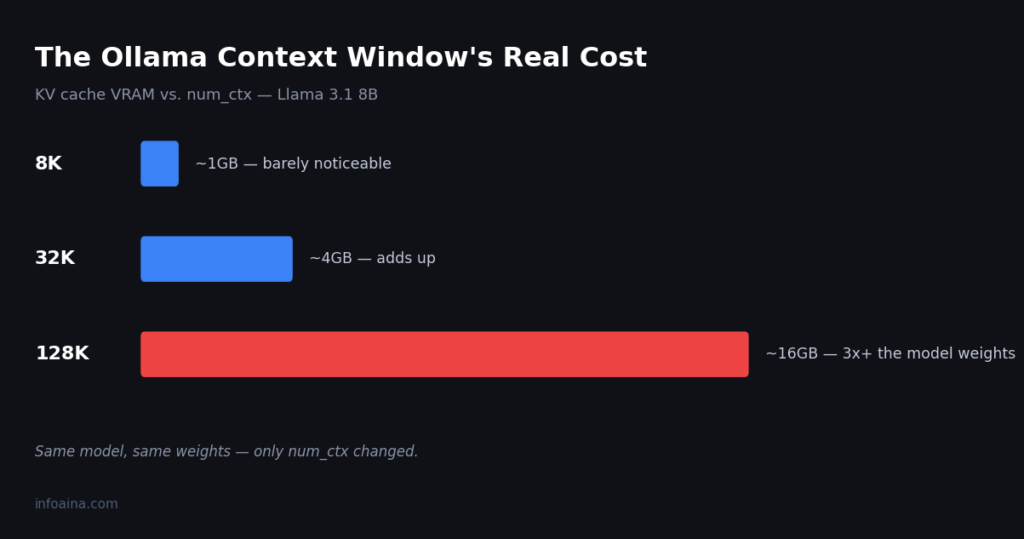
For a sense of the shape of that cost: on Llama 3.1 8B, an 8K context adds somewhere around 1GB of VRAM on top of the model’s own weights — barely noticeable. Push that same model to its full advertised 128K window, though, and the cache cost climbs to somewhere around 16GB — more than triple what the model weights themselves take up, just for the context buffer.
That’s the trade-off nobody puts on the box. A model that comfortably fits your GPU at a small context can genuinely stop fitting once you crank the window up, even though the model itself hasn’t changed size at all.
Checking a Model’s Actual Maximum
Every model has a trained maximum context length, and setting num_ctx past it doesn’t unlock anything — you’ll waste memory at best, get degraded output at worst.
ollama show llama3.1This prints the model’s real context length locally, so you’re not relying on whatever number is printed on its library page. Smaller models in a family tend to have noticeably smaller real maximums than their flagship siblings — check before assuming a huge number quoted for one size applies to a smaller variant you’re actually running.
That’s different from ollama ps, which shows what a currently loaded model is actually running with right now — useful for confirming a context change actually took effect, rather than just what the model is theoretically capable of.
What Context Size Do You Actually Need?
| Use case | Rough context needed | Why |
|---|---|---|
| Quick chat, Q&A | Default is usually fine | Short exchanges rarely approach the limit |
| Long conversations | 8K–16K | Keeps earlier turns from silently dropping |
| Document summarization / RAG | 16K–32K, depending on document size | Retrieved chunks eat context fast |
| Coding agents, tool use | 32K+ | Instructions, file contents, and tool output all share one budget |
If you’re not sure, start around 8K and watch for the model losing track of earlier context before pushing higher. There’s rarely a good reason to max out a model’s advertised context “just in case” — you’re paying real VRAM for tokens you may never use.
FAQ
What is the default Ollama context window?
It depends on your version and VRAM. The Modelfile spec lists 2,048 tokens, though most recent installs on typical consumer GPUs land around 4,096 in practice.
Why does my Ollama model forget earlier parts of the conversation?
The context window filled up. Ollama silently drops the oldest messages instead of erroring, so it looks like the model “forgot” when it actually just ran out of room to remember.
How do I permanently increase the Ollama context window?
Bake num_ctx into a Modelfile and create a new model from it, or set the OLLAMA_CONTEXT_LENGTH environment variable server-wide.
Does increasing num_ctx slow Ollama down?
Indirectly. It doesn’t change token generation speed much on its own, but the extra KV cache VRAM it consumes can push you into a slower quantization or partial CPU offload if you’re already near your VRAM limit.
What’s the difference between num_ctx and OLLAMA_CONTEXT_LENGTH?num_ctx is a per-model or per-request setting. OLLAMA_CONTEXT_LENGTH is a server-wide environment variable that acts as the fallback default when nothing more specific overrides it.
Can I check what context a running model is actually using right now?
Yes — ollama ps shows currently loaded models and their active settings. That’s different from ollama show, which shows a model’s trained maximum regardless of whether it’s currently running.
[…] Ollama Context Window […]